Setup
Install the package, then run the sections below. Each step imports what it needs from tell_me_why (or fastai for the dataset):
1. Binary data: cats vs dogs (PETS)
Each image file name starts with the breed. fastai’s usual rule labels cats when the breed name starts with an uppercase letter and dogs otherwise.
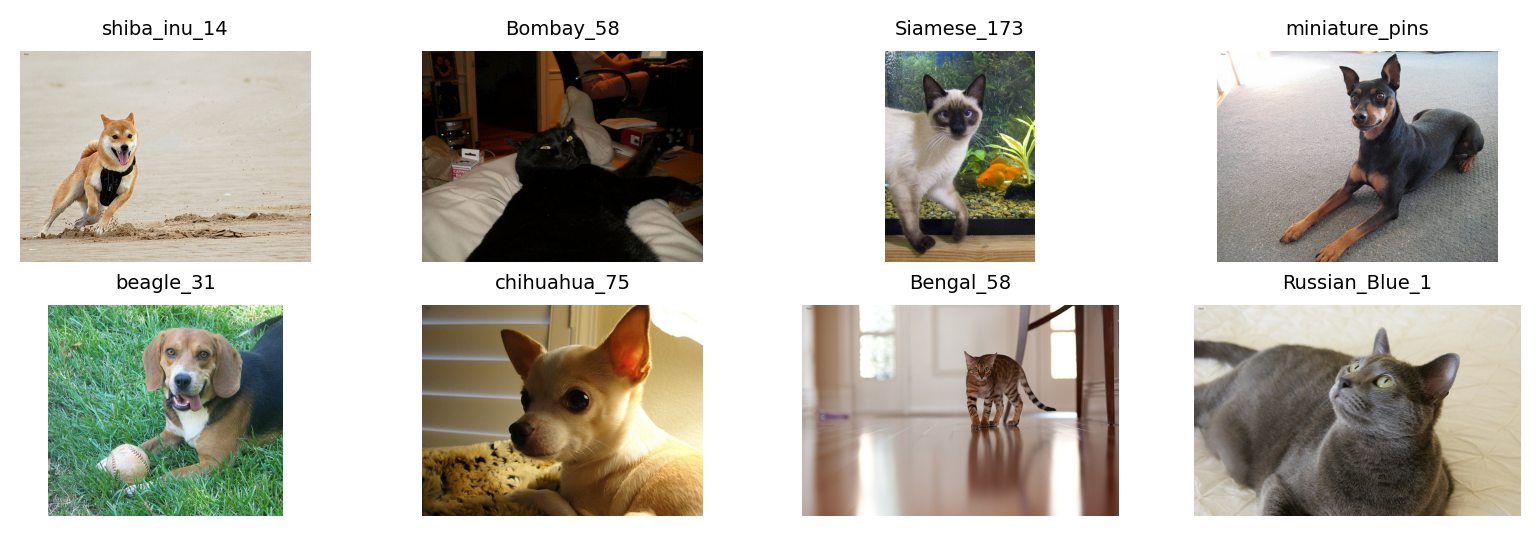
Sample images from the Oxford-IIIT Pet dataset used in this walkthrough:
█

 |----------------------------------------| 0.00% [0/811706944 00:00<?]
 |----------------------------------------| 0.00% [8192/811706944 00:00<00:13]
 |----------------------------------------| 0.93% [7569408/811706944 00:00<01:00]
 |----------------------------------------| 1.22% [9904128/811706944 00:00<00:49]
 |----------------------------------------| 1.56% [12689408/811706944 00:00<00:38]
 |----------------------------------------| 1.98% [16097280/811706944 00:00<00:33]
 |----------------------------------------| 2.45% [19898368/811706944 00:00<00:27]
 |█---------------------------------------| 3.00% [24330240/811706944 00:00<00:25]
 |█---------------------------------------| 3.59% [29114368/811706944 00:00<00:22]
 |█---------------------------------------| 4.23% [34365440/811706944 00:00<00:20]
 |█---------------------------------------| 4.92% [39903232/811706944 00:00<00:18]
 |██--------------------------------------| 5.65% [45842432/811706944 00:01<00:17]
 |██--------------------------------------| 6.41% [52019200/811706944 00:01<00:17]
 |██--------------------------------------| 7.16% [58097664/811706944 00:01<00:16]
 |███-------------------------------------| 7.94% [64479232/811706944 00:01<00:15]
 |███-------------------------------------| 8.74% [70959104/811706944 00:01<00:15]
 |███-------------------------------------| 9.55% [77553664/811706944 00:01<00:14]
 |████------------------------------------| 10.38% [84271104/811706944 00:01<00:14]
 |████------------------------------------| 11.20% [90882048/811706944 00:01<00:13]
 |████------------------------------------| 12.04% [97705984/811706944 00:01<00:13]
 |█████-----------------------------------| 12.88% [104562688/811706944 00:01<00:13]
 |█████-----------------------------------| 13.74% [111517696/811706944 00:02<00:13]
 |█████-----------------------------------| 14.60% [118472704/811706944 00:02<00:12]
 |██████----------------------------------| 15.46% [125526016/811706944 00:02<00:12]
 |██████----------------------------------| 16.35% [132677632/811706944 00:02<00:12]
 |██████----------------------------------| 17.24% [139902976/811706944 00:02<00:11]
 |███████---------------------------------| 18.13% [147193856/811706944 00:02<00:11]
 |███████---------------------------------| 19.03% [154435584/811706944 00:02<00:11]
 |███████---------------------------------| 19.91% [161636352/811706944 00:02<00:11]
 |████████--------------------------------| 20.80% [168828928/811706944 00:02<00:11]
 |████████--------------------------------| 21.69% [176037888/811706944 00:03<00:11]
 |█████████-------------------------------| 22.58% [183320576/811706944 00:03<00:10]
 |█████████-------------------------------| 23.49% [190644224/811706944 00:03<00:10]
 |█████████-------------------------------| 24.39% [197984256/811706944 00:03<00:10]
 |██████████------------------------------| 25.29% [205275136/811706944 00:03<00:10]
 |██████████------------------------------| 26.19% [212615168/811706944 00:03<00:10]
 |██████████------------------------------| 27.10% [219979776/811706944 00:03<00:10]
 |███████████-----------------------------| 28.01% [227336192/811706944 00:03<00:10]
 |███████████-----------------------------| 28.91% [234676224/811706944 00:04<00:09]
 |███████████-----------------------------| 29.82% [242065408/811706944 00:04<00:09]
 |████████████----------------------------| 30.74% [249528320/811706944 00:04<00:09]
 |████████████----------------------------| 31.66% [256966656/811706944 00:04<00:09]
 |█████████████---------------------------| 32.57% [264396800/811706944 00:04<00:09]
 |█████████████---------------------------| 33.49% [271802368/811706944 00:04<00:09]
 |█████████████---------------------------| 34.41% [279281664/811706944 00:04<00:08]
 |██████████████--------------------------| 35.33% [286744576/811706944 00:04<00:08]
 |██████████████--------------------------| 36.24% [294125568/811706944 00:05<00:08]
 |██████████████--------------------------| 37.14% [301498368/811706944 00:05<00:08]
 |███████████████-------------------------| 38.06% [308944896/811706944 00:05<00:08]
 |███████████████-------------------------| 38.98% [316399616/811706944 00:05<00:08]
 |███████████████-------------------------| 39.90% [323837952/811706944 00:05<00:08]
 |████████████████------------------------| 40.81% [331243520/811706944 00:05<00:08]
 |████████████████------------------------| 41.72% [338640896/811706944 00:05<00:08]
 |█████████████████-----------------------| 42.63% [346013696/811706944 00:05<00:07]
 |█████████████████-----------------------| 43.54% [353402880/811706944 00:06<00:07]
 |█████████████████-----------------------| 44.45% [360783872/811706944 00:06<00:07]
 |██████████████████----------------------| 45.36% [368205824/811706944 00:06<00:07]
 |██████████████████----------------------| 46.28% [375660544/811706944 00:06<00:07]
 |██████████████████----------------------| 47.20% [383148032/811706944 00:06<00:07]
 |███████████████████---------------------| 48.13% [390668288/811706944 00:06<00:06]
 |███████████████████---------------------| 49.06% [398221312/811706944 00:06<00:06]
 |███████████████████---------------------| 49.99% [405766144/811706944 00:06<00:06]
 |████████████████████--------------------| 50.92% [413343744/811706944 00:06<00:06]
 |████████████████████--------------------| 51.86% [420921344/811706944 00:06<00:06]
 |█████████████████████-------------------| 52.79% [428474368/811706944 00:07<00:06]
 |█████████████████████-------------------| 53.72% [436035584/811706944 00:07<00:06]
 |█████████████████████-------------------| 54.65% [443621376/811706944 00:07<00:06]
 |██████████████████████------------------| 55.59% [451223552/811706944 00:07<00:05]
 |██████████████████████------------------| 56.52% [458809344/811706944 00:07<00:05]
 |██████████████████████------------------| 57.46% [466378752/811706944 00:07<00:05]
 |███████████████████████-----------------| 58.39% [473964544/811706944 00:07<00:05]
 |███████████████████████-----------------| 59.32% [481542144/811706944 00:07<00:05]
 |████████████████████████----------------| 60.26% [489111552/811706944 00:08<00:05]
 |████████████████████████----------------| 61.19% [496689152/811706944 00:08<00:05]
 |████████████████████████----------------| 62.13% [504291328/811706944 00:08<00:05]
 |█████████████████████████---------------| 63.06% [511893504/811706944 00:08<00:04]
 |█████████████████████████---------------| 64.00% [519462912/811706944 00:08<00:04]
 |█████████████████████████---------------| 64.93% [527073280/811706944 00:08<00:04]
 |██████████████████████████--------------| 65.87% [534675456/811706944 00:08<00:04]
 |██████████████████████████--------------| 66.81% [542302208/811706944 00:08<00:04]
 |███████████████████████████-------------| 67.75% [549937152/811706944 00:09<00:04]
 |███████████████████████████-------------| 68.69% [557522944/811706944 00:09<00:04]
 |███████████████████████████-------------| 69.62% [565116928/811706944 00:09<00:04]
 |████████████████████████████------------| 70.55% [572694528/811706944 00:09<00:03]
 |████████████████████████████------------| 71.49% [580272128/811706944 00:09<00:03]
 |████████████████████████████------------| 72.42% [587825152/811706944 00:09<00:03]
 |█████████████████████████████-----------| 73.35% [595378176/811706944 00:09<00:03]
 |█████████████████████████████-----------| 74.28% [602947584/811706944 00:09<00:03]
 |██████████████████████████████----------| 75.22% [610549760/811706944 00:09<00:03]
 |██████████████████████████████----------| 76.16% [618168320/811706944 00:10<00:03]
 |██████████████████████████████----------| 77.09% [625778688/811706944 00:10<00:03]
 |███████████████████████████████---------| 78.03% [633405440/811706944 00:10<00:02]
 |███████████████████████████████---------| 78.97% [641040384/811706944 00:10<00:02]
 |███████████████████████████████---------| 79.92% [648691712/811706944 00:10<00:02]
 |████████████████████████████████--------| 80.86% [656326656/811706944 00:10<00:02]
 |████████████████████████████████--------| 81.80% [663953408/811706944 00:10<00:02]
 |█████████████████████████████████-------| 82.73% [671563776/811706944 00:10<00:02]
 |█████████████████████████████████-------| 83.67% [679182336/811706944 00:11<00:02]
 |█████████████████████████████████-------| 84.61% [686817280/811706944 00:11<00:02]
 |██████████████████████████████████------| 85.56% [694468608/811706944 00:11<00:01]
 |██████████████████████████████████------| 86.50% [702111744/811706944 00:11<00:01]
 |██████████████████████████████████------| 87.44% [709771264/811706944 00:11<00:01]
 |███████████████████████████████████-----| 88.39% [717447168/811706944 00:11<00:01]
 |███████████████████████████████████-----| 89.33% [725131264/811706944 00:11<00:01]
 |████████████████████████████████████----| 90.28% [732807168/811706944 00:11<00:01]
 |████████████████████████████████████----| 91.22% [740474880/811706944 00:11<00:01]
 |████████████████████████████████████----| 92.17% [748158976/811706944 00:12<00:01]
 |█████████████████████████████████████---| 93.12% [755843072/811706944 00:12<00:00]
 |█████████████████████████████████████---| 94.07% [763535360/811706944 00:12<00:00]
 |██████████████████████████████████████--| 95.01% [771219456/811706944 00:12<00:00]
 |██████████████████████████████████████--| 95.96% [778928128/811706944 00:12<00:00]
 |██████████████████████████████████████--| 96.91% [786636800/811706944 00:12<00:00]
 |███████████████████████████████████████-| 97.86% [794361856/811706944 00:12<00:00]
 |███████████████████████████████████████-| 98.82% [802095104/811706944 00:12<00:00]
 |███████████████████████████████████████-| 99.77% [809811968/811706944 00:12<00:00]
 |████████████████████████████████████████| 100.00% [811712512/811706944 00:12<00:00]
2. Train an explainable model
We use the built-in AAEcustom encoder , use EncoderWithAAEBlocksAdd xAAEnet Blocks to a User Encoder ).
Build fastai dataloaders on PETS (300×300 here; match AAE(input_size=…)), then run train_xaaenet (three phases; increase epochs_* for real runs).
Training dataloaders
For train_xaaenet, we label cats vs dogs from the file name (uppercase breed → cat) and resize to 300×300 (same value as AAE(input_size=300) below).
from fastai.vision.all import (def pet_species(path):"""Cat breeds start with an uppercase letter in the PETS file names.""" return "cat" if path.name[0 ].isupper() else "dog" # Subsample for a quicker first run (remove [:400] for the full dataset) = list (get_image_files(pets_path))[:400 ]= DataBlock(= (ImageBlock, CategoryBlock),= lambda _: pet_items,= RandomSplitter(valid_pct= 0.2 , seed= 42 ),= pet_species,= Resize(300 ),= dblock.dataloaders(pets_path, bs= 16 , num_workers= 0 )len (dls.train_ds), len (dls.valid_ds)
Choose which species is class A (target_score = 1.0). With pet_species, the vocabulary is cat and dog:
= "cat" = "dog"
from tell_me_why.model_aae import AAEfrom tell_me_why.training import train_xaaenet= AAE(input_size= 300 , encoding_dims= 128 )= train_xaaenet(= 1 ,= 1 ,= 2 ,= False ,= False ,= True ,= False ,
3. Validation latent codes z and binary targets
Collect one latent row per validation image by running the trained model on the validation dataloader. Row order matches learn.dls.valid (no shuffling on the validation set).
Do not reorder images before the feature table in the next step.
import numpy as npimport torch@torch.no_grad ()def latent_and_targets_from_split(learn, ds_idx= 1 ):eval ()= [], []for xb, yb in learn.dls[ds_idx]:= torch.cat(z_parts).numpy()= torch.cat(y_parts).view(- 1 ).numpy()return z, targets= latent_and_targets_from_split(learn, ds_idx= 1 )= (targets_val == learn.dls.vocab.o2i[class_a_name]).astype(np.float64)
# Same row order as z_val / target_score = [str (p) for p in learn.dls.valid.items]len (image_paths), image_paths[0 ]
4. Feature score table
compute_feature_score_table turns each image path into numeric cues (brightness, color, texture, …). Row order must match z_val on the validation split.
The table below uses the same PETS sample paths as above. After training, score the full validation set.
from pathlib import Pathfrom tell_me_why.feature_scores import compute_feature_score_tabledef format_feature_table(df):"""Drop full paths; show file names first (same layout as the Feature scores example).""" = df.copy()"image_name" ] = out["Source_File_Path" ].map (lambda path: Path(path).name)= out.drop(columns= "Source_File_Path" )return out[["image_name" , * [col for col in out.columns if col != "image_name" ]]]
= compute_feature_score_table(= ["brightness" ,"variance" ,"redness_dominance" ,"symmetry_error" ,"fft_high_frequency_ratio" ,= "raise" ,round (4 )
Computing brightness:   0%|          | 0/8 [00:00<?, ?it/s]
Computing brightness: 100%|##########| 8/8 [00:00<00:00, 562.34it/s]

Computing variance / contrast:   0%|          | 0/8 [00:00<?, ?it/s]
Computing variance / contrast: 100%|##########| 8/8 [00:00<00:00, 543.46it/s]

Computing red dominance:   0%|          | 0/8 [00:00<?, ?it/s]
Computing red dominance: 100%|##########| 8/8 [00:00<00:00, 415.47it/s]

Computing symmetry:   0%|          | 0/8 [00:00<?, ?it/s]
Computing symmetry: 100%|##########| 8/8 [00:00<00:00, 567.84it/s]

Computing FFT scores:   0%|          | 0/8 [00:00<?, ?it/s]
Computing FFT scores: 100%|##########| 8/8 [00:00<00:00, 391.04it/s]
0
shiba_inu_14.jpg
0.7555
0.0176
0.5491
0.0889
0.5315
1
Bombay_58.jpg
0.1711
0.0477
0.7016
0.1534
0.4465
2
Siamese_173.jpg
0.4284
0.0479
0.5613
0.2105
0.5394
3
miniature_pinscher_4.jpg
0.5688
0.0625
0.5165
0.2563
0.4899
4
beagle_31.jpg
0.4799
0.0355
0.4072
0.2172
0.6502
5
chihuahua_75.jpg
0.4795
0.0594
0.7384
0.2793
0.4448
6
Bengal_58.jpg
0.6254
0.0477
0.5762
0.2379
0.4307
7
Russian_Blue_130.jpg
0.5452
0.0665
0.5519
0.1784
0.4253
Scores on the validation split
After training, build the table on every validation image (all default feature columns). Use the same paths as in step 3, in the same order as z_val.
= compute_feature_score_table(image_paths)round (4 )
Reading the results (short checklist)
Importance ranking — features at the top have the strongest signed r² with PLS1 toward class A; near-zero bars were weakly aligned on this axis.Alignment panels — diagonal green line + separated grey/blue clouds suggest a pixel cue that co-varies with the latent decision axis; a flat line suggests little linear link.Causality — alignment is a comparison between latent space and hand-crafted scores, not a proof of what neurons implement.
Next steps
Train longer and on the full PETS split (or your own binary dataset).
Swap AAE for EncoderWithAAEBlocks when you bring a custom encoder.
Reuse the same z + df_features + run_pls_feature_figures pipeline after any binary xAAEnet training run.